Having the benefit of a career full of good and bad photographic experiences to draw on but answering to no camera sponsors, I feel I can be neutral about camera brands and focus on features that I would ask you to consider as you research buying your DSLR. Ultimately, your personal preferences and the size of your pocketbook will determine your selection. I will not be advising you to buy a Nikon, Canon, Pentax, Olympus, Fuji or Sony DSLR. But do keep these facts in mind during your research.
To be perfectly clear, I am aiming my comments toward those purchasing a
Digital
Single
Lens
Reflex camera -- affectionately known as DSLRs. This class of cameras is used both by amateurs and professionals and is among one of the fastest growing segments of the photographic industry. Today's DSLR cameras generally share these minimum features:
- The ability to interchange lenses (i.e., normal, zoom, wide angle, telephoto).
- A light collecting sensor to capture the image (exposure) -- typically a CCD (charge-coupled device) - providing image files from 8 to 24 megapixels in size.
- The ability to view and compose an image while looking through the camera's taking lens to see precisely the image that will be captured (not through a viewfinder which is set off to the side and has its own secondary "window on the scene").
- A built-in light meter and computing power capable of measuring the available light and automatically adjusting the camera's light controls (aperture and shutter) to their optimum settings based on the photographer's pre-set requirements.
- The ability to review an image immediately after the picture is taken.
- The ability to store image files on one of the many data card formats available (today's equivalent to traditional film).
- A built-in flash for low light or indoor photography.
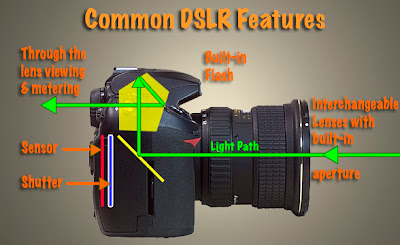
This picture of my Nikon DSLR (taken with my Canon DSLR)
illustrates the features common to DSLR cameras.
Those are all the features a camera requires to be classified as a DSLR. However, most manufacturers add significant enhancements to these basics in their more advanced models. But be forewarned, the more enhancements incorporated the more the camera will cost.
- Higher resolutions - capturing more pixels of information for each picture taken (6 to 8 megapixels is normal for the lower priced DSLRs while 10 to 24 megapixels per image is the range for the higher end DSLRs).
- More photographer controls to override or enhance the camera's automated exposure system.
- Higher images (frames) per second rates allowing high speed photography at 8 frames or more per second.
- More selections of shutter speeds (from extremely slow to very fast).
- More flash photography options including connections for external flashes.
- Enhanced information displays including histograms (graphic representation of each exposure).
- Some cameras now offer full 35mm frame coverage to match traditional film 35mm cameras and provide a larger area of coverage as well as a larger final image file size.
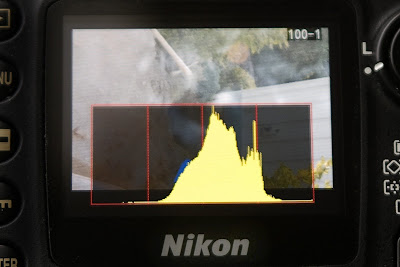
When researching your DSLR purchase, make sure the camera you are considering has the capability to display a "histogram" superimposed on the preview image (Nikon camera sample shown above) after each picture is taken.The list goes on and on with more features on the next generation drawing board. For example, it won't be long before GPS technology is fully incorporated into DSLRs. When this happens, the exact location of each picture you take will be "written" into the digital image file. Using services like Google Maps, you'll not only be able to share your pictures online with your family and friends but you'll also be able to provide a map to the exact location. Pretty cool.
But for now, you need to decide what features you are looking for in a camera and the price range you can afford.
Start the process by knowing that all name brand DSLR cameras are GOOD. If you've always loved Simon and Garfunkel's
Kodachrome then you might be predisposed to
Nikon cameras. Or, if you've noticed a long line up of gray colored telephoto lenses being used by photojournalists on the Super Bowl sidelines, you might be leaning towards
Canon cameras. Of course, there's always the cameras that your friends are using and recommending.
In these cases as with other respected brands like
Pentax,
Olympus,
Fuji and
Sony, the basic DSLRs they offer are very good digital cameras. Knowing that it's hard to make a bad choice, I would suggest you do the following:
- Put together a list of "must haves" and "nice to haves" for your dream camera.
- Determine in advance the most money you want to spend for the basic camera.
- Visit a camera shop that has several camera brands.
- I find that camera shops have more technically savvy sales staff. So let your salesperson know the type of pictures you want to take with your camera. Share your list of "wants". Then take a close look at the cameras these helpful folks recommend.
- Don't stop there. Ask to see some of the comparable cameras from other manufacturers. You need to get the "feel" of the cameras. You will have to live with your purchase for several years. So make certain the camera is comfortable in your hands and that the various controls are easy for you to reach and manipulate.
- In the same manner, check to make sure the information displayed in the viewfinder and on the camera's LCD displays are easy for you to read and make adjustments from.
- Take your time. With your mind overwhelmed with information... go home... take a day or two to absorb this information... and do some Internet research. This "cooling down period" should bring an adequate dose of objectivity to your final purchase decision.
I would also suggest that your list of digital camera "musts" include at least the following:
- 8"x10" prints are typically the largest size most often printed by first time photographers. With this in mind, a camera capable of shooting pictures in the 8 to 10 megapixel range will provide ample image information to provide sharp prints up to 11"x14" in size.
- The capability to show a "histogram" on the camera's image preview screen immediately after you take each picture.
- The ability to allow you to select between auto, manual, aperture priority and shutter priority modes.
- The ability to store images in RAW format.
- A flash "shoe" that allows you to eventually mount an external flash on your camera. (All suggested cameras will likely come with a built-in flash.)
- A manual depth of field preview button.
- The ability to accept a shutter release cable.
- Most cameras automatically include computer connection hardware, software and a battery charger, but check to make sure.
The good news is that even the least expensive DSLRs contain most of the items on my "must" list. Spending more money will provide advanced features and greater image file sizes (more pixel density in each digital image for larger prints) which you may or may not use -- depending on the growth of your photographic interest. (That range of photographic interests currently translates in dollars to cameras priced from approximately $500 to $6,000.)
Overspending is easy. Just be aware that even the lower priced DSLRs from major camera manufacturers take excellent pictures and afford you exceptional flexibility in the types of pictures you can take.
Whatever your camera decision, please be loyal to the store that spent their valuable time educating you. Too often have I seen camera buyers consume hours of store personnel time to see every available camera while picking the staff's brains for technical insights, only to discover later that the buyer went somewhere else to make the final purchase. If the store personnel have truly been courteous and helpful, reward them with your purchase.
Believe me, even if you pay a little more for the camera, your loyalty will be repaid generously every time you need help or support. These folks will quickly become your most trusted photographic friends.
If the terms "histogram" and 'RAW format' are new to you, and you are wondering why I consider these features a must for every photographer, please review my "Hub's Camera Blog" for a detailed explanation. It's important. URL: www.hubbardcamera.com
In the next post, I'll provide my TIP for your second most important camera accessory purchase.
As always if you have questions or comments, just let me know.